
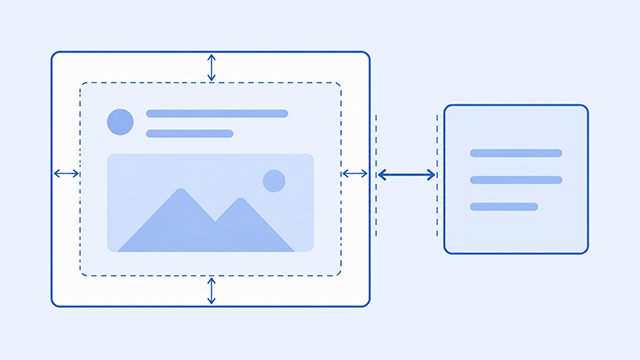
The difference between margin and padding is simple: padding creates space inside an element, while margin creates space outside an element.
Both properties add space, so it is normal for beginners to mix them up. The useful question is not just, “Which property adds space?” It is where the space should go.
By the end of this article, you should be able to look at a spacing problem and decide whether it needs padding or margin.
Every visible part of a web page can be understood as a box. The CSS box model explains the parts of that box and where spacing fits.
The Simple Difference
Use padding when you want more room between the content and the edge of the same element.
Use margin when you want more room between one element and the elements around it.
Imagine a card with text inside it. If the text feels too close to the card’s edge, that is an inside-spacing problem. Use padding.
If the entire card feels too close to another card, heading, image, or section, that is an outside-spacing problem. Use margin.
Think of Every Element as a Box
Most HTML elements can be understood as boxes. A paragraph is a box. A heading is a box. An image is a box. A button is a box. A div is a general-purpose box used to group other elements.
The HTML boxes lesson explains this structure from the HTML side. CSS then controls how those boxes look, how much room they use, and how far apart they sit.
Here is a small example containing the main parts of the box model:
.card {
    width: 300px;
    padding: 20px;
    border: 2px solid #333;
    margin: 24px;
}
The width controls the content area. The padding creates space inside the card. The border forms its visible edge. The margin creates space outside the card.
A useful order to remember is content, padding, border, margin. Padding sits between the content and border. Margin sits outside the border.
Use Padding for Space Inside the Element
Padding is useful when an element has a background, border, or clickable area. It gives the content room inside its own box.
Here is a simple card with padding:
.card {
    background-color: #f2f6ff;
    padding: 24px;
}
The padding pushes the text away from the card’s edges. Without it, the content may feel cramped, especially when the card has a visible background.
Padding is common on buttons, cards, form fields, alerts, and page sections. When content is too close to its own edge, the padding lesson is the best next step.
Use Margin for Space Between Elements
Margin moves one element away from another. It creates space between separate boxes.
Here is a common example with cards stacked vertically:
.card {
    padding: 24px;
    border: 1px solid #ccc;
    margin-bottom: 20px;
}
The padding gives the content room inside each card. The margin-bottom creates space below each card.
Margin is common between headings, paragraphs, images, cards, lists, and sections. When two separate elements are too close together, review the margin lesson.
A Quick Way to Choose
When you are unsure whether to use margin or padding, ask one question: Where should the space go?
- If the space should be inside the element, use padding.
- If the space should be between elements, use margin.
- If content is touching the edge of a button, card, or section, use padding.
- If two boxes are too close together, use margin.
This rule does not answer every advanced layout question, but it solves many common beginner spacing problems.
Why Padding Can Make a Box Bigger
One common surprise is that padding can make an element wider than expected.
In the standard CSS box model, the width normally controls the content area. Padding and border are then added around that content.
.box {
    width: 300px;
    padding: 20px;
    border: 2px solid #333;
}
This box has 300 pixels of content width. The padding and border add more width around it, so the finished box is wider than 300px.
Many projects use box-sizing: border-box; to make sizing easier to predict. With that setting, the declared width includes the content, padding, and border.
.box {
    box-sizing: border-box;
    width: 300px;
    padding: 20px;
    border: 2px solid #333;
}
You do not need to master box-sizing immediately. The important distinction is still the same: padding belongs inside the box, while margin sits outside it.
A Small Practice Test
The easiest way to understand the difference is to change one property at a time.
.card {
    background-color: #f2f6ff;
    border: 1px solid #88a;
    padding: 10px;
    margin-bottom: 10px;
}- Change
paddingfrom10pxto30pxand watch the space inside the card. - Change
margin-bottomfrom10pxto30pxand watch the space below the card. - Add a second card so the outside spacing becomes easier to see.
After each change, explain what moved in plain language. That habit makes CSS behavior much easier to remember.
What to Learn Next
Once the difference between margin and padding is clear, the next step is seeing how both properties fit into the larger box model.
- CSS Box Model explains how content, padding, border, and margin work together as one complete system.
- CSS Padding shows how to control space inside buttons, cards, sections, and other elements.
- CSS Margin explains how to create and control space between separate elements.
- HTML Boxes helps you understand why headings, paragraphs, images, sections, and other page elements can all be treated as boxes.