
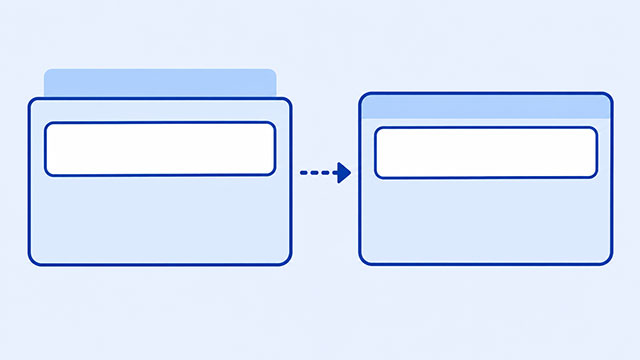
If a heading’s margin seems to move the whole section around it, the margin may be reaching outside the parent box. This is a normal CSS behavior called margin collapse, and it becomes much easier to fix once you decide which box should own the space.
The browser is not ignoring your CSS. It is treating touching vertical margins as one shared space. In this article, you will see why that happens, how to recognize it, and when padding inside the parent is the clearer choice.
This problem usually appears with block elements such as headings, paragraphs, and sections. If you want a refresher, the HTML block elements lesson explains why these elements normally stack as separate boxes.
The Margin May Be Outside the Parent
Picture a section as a large box with a heading inside it. A heading’s top margin is supposed to create space above the heading. But if the section has no padding, border, or other content separating its top edge from the heading, the two edges are touching.
When touching vertical margins meet, the browser can combine them into one margin. This behavior is called margin collapse. The heading’s margin can end up outside the section, so the section’s background appears to move down with the heading.
For two positive vertical margins, the browser normally uses the larger margin, not the total of both margins. That can feel surprising when you are expecting every number in the CSS to be added together.
A Small Example That Shows the Problem
Here is a small section with a background color. The heading has a top margin, but the section has no padding at its top edge.
<section class="hero">
    <h1>My First Website</h1>
</section>
.hero {
background: lightblue;
}
.hero h1 {
margin-top: 40px;
}The h1 is inside the section, but its top margin can collapse with the section’s top margin. The result is that the blue area starts lower than you expected. The space is still real; it is just being placed outside the parent box.
That is why adding a visible background or border is useful while learning. It helps you see the edge of the parent box instead of guessing where the space went.
Use Padding When the Space Belongs Inside the Section
Ask a simple question: should the space be inside the colored section, or should it separate the section from nearby sections? If the space belongs inside, put it on the parent with padding.
.hero {
    background: lightblue;
    padding-top: 40px;
}

.hero h1 {
    margin-top: 0;
}
Now the section owns the space at its top edge. The background includes that space, and the heading sits inside the parent’s box instead of pushing the margin outside it.
Margin is usually for space between boxes. Padding is for space between a box’s content and its edge. The CSS box model lesson shows how content, padding, border, and margin fit together.
Neither choice is automatically better. The useful question is who should own the space. Choosing the owner makes the layout easier to predict.
Other Times Margins Seem to Behave Strangely
Margin collapse can also happen when two block elements sit one after the other. For example, a heading may have a bottom margin of 24 pixels and the paragraph below it may have a top margin of 16 pixels. The gap is usually 24 pixels, not 40.
h2 {
    margin-bottom: 24px;
}

p {
    margin-top: 16px;
}
This behavior applies to vertical margins in normal block layout. Left and right margins do not collapse in the same way. You do not need to memorize every edge case yet; start by checking whether two vertical margins are touching.
A Quick Spacing Check
When a margin seems to move a whole section, work through these questions:
- Which box should own the space: the child, the parent, or the gap between two boxes?
- Are the margins on the top or bottom edges of block elements?
- Are the parent and child touching with no padding or border between them?
- Would
padding-toporpadding-bottomdescribe the space more accurately?
The CSS Margin lesson is the best next reference when you need to control space outside a box. The CSS Padding lesson helps when the content needs room inside its parent.
Once you can see which box owns the space, margin collapse stops feeling random. You are simply choosing whether the space belongs inside the box or outside it.
What to Learn Next
Continue with the lessons that make the box relationship easier to see and use:
- CSS Margin explains how to create space outside an element.
- CSS Box Model shows how content, padding, border, and margin work together.
- CSS Padding shows how to create space inside a box.
- HTML Block Elements explains why headings, paragraphs, and sections stack as page boxes.